FTDX1200 Operating Manual Page 61

TOOLS FOR COMFORTABLE AND EFFECTIVE RECEPTION Cont'd

Previous Page    Index of Topics    Table of Contents    Index of Pages    Next Page

AGC (AUTONMATIC GAIN CONTROL)

Using DSP arithmetic processing and the normal bandwidth The AGC system is designed to help compensate for fading and other propagation effects. The AGC characteristics can be individually set for each operating mode. The basic objective of AGC is to maintain a constant audio output level once a certain minimum threshold of signal strength is achieved.

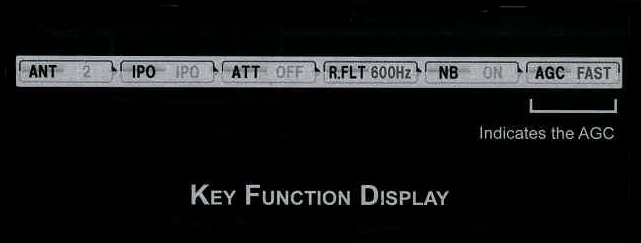
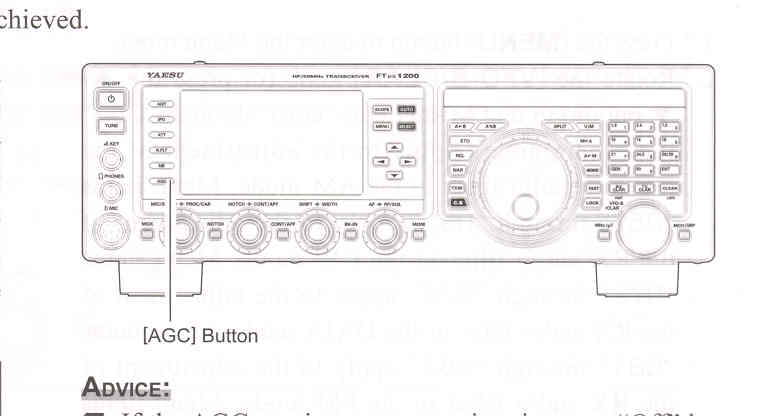
Press the [AGC] button repeatedly to select the desired receiver-recovery time constant. You will observe the AGC status notation in the AGC column of the Key Function Display on the TFT display, denoting the AGC receiver-recovery time currently in use. For most operations, we recommend the "AUTO" mode. Additionally, you may disable the AGC by pressing and holding in the [AGC] button for one second.

NOTE:

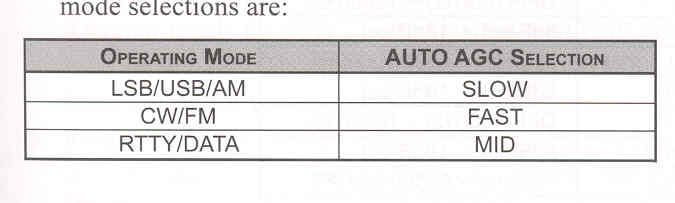
The "AUTO" selection mode selects the optimum receiver-recovery time for the reception mode.
In this case, the selected receiver-recovery tim in the AGC column of the Key Function Display glows green (Normally glows blue).

Pressing the [AGC] button allows selection of the desired receiver-recovery time constant. Normally, the "AUTO" selection is satisfactory for most situations, but in the event of operating on a crowded band where you wish to receive a weak signal, you may wish to change the setting to "FAST". The AUTO mode selections are:


ADVICE:

If the AGC receiver-recovery time is set to "Off" by pressing and holding in the [AGC] button, the S-meter will no longer deflect. Additionally, you will likely encounter distortion on stronger signals, as the IF amplifiers and the following stages are probably being overloaded.

QUICK POINT:
Several aspects of AGC performance may be configured via the Menu. However, because AGC can have such a profound impact on overall receiver performance, we generally do not recommend any changes to the AGC Menu selections until you are thoroughly familar with the performance of the FTDX1200.

TERMINOLOGY:
Automatic Gain Control, or AGC, is a circuit that senses the received signal strength, and them limits the gain of the RF adn IF stages to keep the output audio volume at a more-or-less constant level. AGC also protects the RF, IF, Audio, and DSP stages from overload, as it limits the signal strength that is allowed to flow, irrespective of the input signal level.

SLOPED AGC OPERATION

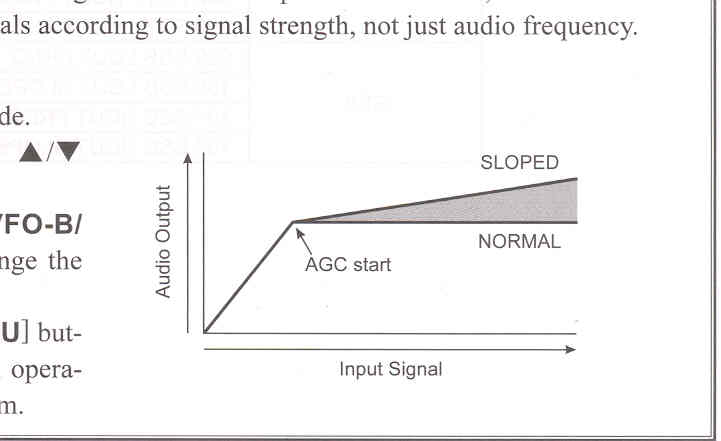
In traditional AGC systems, the audio output from the transceiver becomes essentially fixed once the threshold for AGC action is reached (usually several dozen dB above the no-signal noise floor). The FTDX200,

however, includes an innovative Sloped AGC system on the Mani band (VFO-A) receiver, that allows the audio volume to rise and fall slightly according to signal strength. Although the rise/fall slope is not dramatic, it is sufficient to allow you to use your ear to discern and separate signals according to signal strength, not just audio frequency.

Using Sloped AGC:

    1. Press the [MENU] button to engage the Menu mode.

    2. Rotate the [VFO-B/CLAR] knob (or press the ▲/▼ button) to select Menu item "004 AGC SLOPE".

3. Press the [SELECT] button, then rotate the [VFO-B/CLAR] knob (or press the ▲/▼ button) to change the setting to "SLOPE".

4. Press the [SELECT] button, then press the [MENU] button to lock in the new setting and exit to normal operation. You will now be using the Sloped AGC system.


End of "AGC (Automaic Gain Control)"

Cont'd Next Page "Tools for Comfortable and Effective Reception"

Previous Page    Index of Topics    Table of Contents    Back to Top    Index of Pages    Next Page

FTDX1200 Operating Manual Page 61